| Mirage Source http://miragesource.net/forums/ |
|
| Programming an Admin panel http://miragesource.net/forums/viewtopic.php?f=201&t=4310 |
Page 1 of 2 |
| Author: | Nean [ Sun Sep 14, 2008 3:26 am ] |
| Post subject: | Programming an Admin panel |
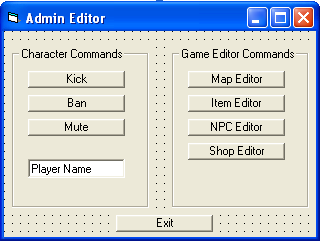
![]() So what I want to know how to do is be able to type the characters name into the text, and then press a button, and have it happen to the character. So if I typed in: Nean, in the text, and typed kick. It would kick myself. Second of all, I just want to know how to send a request for the other buttons such as: Case CRequesteditmap. If I can get an example for one button for each frame. I can take it from there. Thanks. |
|
| Author: | Rian [ Sun Sep 14, 2008 3:33 am ] |
| Post subject: | Re: Programming an Admin panel |
Just working on converting a lot of the admin's text commands into buttons and what not myself Here's some things I've got in my source. Shoudn't be too hard for you to figure out what to do. Search for "/ban" in modGameLogic (I think) to see what the text command does. Then compare it to the code below, which is for banning a player with a text box, and a button. Code: Private Sub cmdBanPlayer_Click() If GetPlayerAccess(MyIndex) >= ADMIN_MAPPER Then Call SendBan(Trim(txtBanPlayer.Text)) End If End Sub And now find the "/mapeditor" command, and compare it to this button's code: Code: Private Sub cmdEdit_Click() Call SendRequestEditMap End Sub Private Sub cmdEdit_Click() comes from my Mapreport Upgrage tutorial. |
|
| Author: | Nean [ Sun Sep 14, 2008 4:02 am ] |
| Post subject: | Re: Programming an Admin panel |
Sonire wrote: Just working on converting a lot of the admin's text commands into buttons and what not myself Here's some things I've got in my source. Shoudn't be too hard for you to figure out what to do. Search for "/ban" in modGameLogic (I think) to see what the text command does. Then compare it to the code below, which is for banning a player with a text box, and a button. Code: Private Sub cmdBanPlayer_Click() If GetPlayerAccess(MyIndex) >= ADMIN_MAPPER Then Call SendBan(Trim(txtBanPlayer.Text)) End If End Sub And now find the "/mapeditor" command, and compare it to this button's code: Code: Private Sub cmdEdit_Click() Call SendRequestEditMap End Sub Private Sub cmdEdit_Click() comes from my Mapreport Upgrage tutorial. Dude you kick so much ass! Thanks a lot. I had the right idea for the edit buttons, I just didn't put call beforehand, and I had to make it chance the width for the mapeditor. I also got the ban and kick button done, but not the mute yet, because I haven't programmed that in. Any suggestions on how to go about programming a mute command? |
|
| Author: | Doomy [ Sun Sep 14, 2008 4:24 am ] |
| Post subject: | Re: Programming an Admin panel |
lol ya i had trouble for this too i got like 15 buttons now |
|
| Author: | Rian [ Sun Sep 14, 2008 4:55 am ] |
| Post subject: | Re: Programming an Admin panel |
For the mute command, I would add a variable to the PlayerRec: Mute As Byte Then you'll neet to create a packet (like the ones your admin panel buttons send) Server side, where you receive the packet, you'll need to check Code: If GetPlayerMute(Index) = 0 Then SetPlayerMute(Index, 1) ' Mute Them Else SetPlayerMute(Index, 0) ' Unmute Them End If And this somewhere Code: Function GetPlayerMute(ByVal Index As Long) As Long GetPlayerMute = Player(Index).Char(Player(Index).CharNum).Mute End Function Sub SetPlayerMute(ByVal Index As Long, ByVal Mute As Byte) Player(Index).Char(Player(Index).CharNum).Mute = Mute End Sub Then, for which ever msg type you wanna mute, you just add a check Code: If GetPlayerMute(Index) = 1 then Don't Global Message Else Do Global Message End If That should get you on the right path. If you have trouble with packets, I'll explain more. |
|
| Author: | Lea [ Sun Sep 14, 2008 4:58 am ] |
| Post subject: | Re: Programming an Admin panel |
I think I would try to add mute without any packet changes or server changes. It's doable... and then it wouldn't add any server load. |
|
| Author: | Nean [ Sun Sep 14, 2008 5:12 am ] |
| Post subject: | Re: Programming an Admin panel |
I think I understand everything but Code: If GetPlayerMute(Index) = 0 Then
SetPlayerMute(Index, 1) ' Mute Them Else SetPlayerMute(Index, 0) ' Unmute Them End If |
|
| Author: | Lea [ Sun Sep 14, 2008 5:21 am ] |
| Post subject: | Re: Programming an Admin panel |
oh I misinterpreted, negate my last post. If you want to globally mute someone, you'd need to send that server side. If you players to mute specific other players for only themselves, you can do that all client side. server side to change their mute status you would do that to change their status. I would streamline it a bit and do SetPlayerMute(Index, !GetPlayerMute(Index)) which means SetPlayerMute(Index, Not GetPlayerMute(INdex)) Horray for boolean logic! |
|
| Author: | Doomy [ Sun Sep 14, 2008 6:06 am ] |
| Post subject: | Re: Programming an Admin panel |
i nvr even thought of muting someone lol |
|
| Author: | Lea [ Sun Sep 14, 2008 3:38 pm ] |
| Post subject: | Re: Programming an Admin panel |
oops |
|
| Author: | Nean [ Tue Sep 16, 2008 11:02 pm ] |
| Post subject: | Re: Programming an Admin panel |
I decided to take another go at this, but I'm uber failing. So far for the packet, I've just been editing the kickplayer packet, like a n00b, and it doesn't go so well.. Code: Case CMutePlayer So what should I add?' Prevent hacking If GetPlayerAccess(Index) <= 0 Then Call HackingAttempt(Index, "Admin Cloning") Exit Sub End If ' The player index n = FindPlayer(Parse(1)) If n <> Index Then If n > 0 Then If GetPlayerAccess(n) <= GetPlayerAccess(Index) Then Call GlobalMsg(GetPlayerName(n) & " has been muted on " & GAME_NAME & " by " & GetPlayerName(Index) & "!", White) Call AddLog(GetPlayerName(Index) & " has muted " & GetPlayerName(n) & ".", ADMIN_LOG) Call PlayerMsg(n, "You have been muted by " & GetPlayerName(Index) & "!") Else Call PlayerMsg(Index, "That is a higher access admin then you!", White) End If Else Call PlayerMsg(Index, "Player is not online.", White) End If Else Call PlayerMsg(Index, "You cannot mute yourself!", White) End If Exit Sub I think I went over my head with this. Someone should make a tut for this. =D... I'd be happy. |
|
| Author: | Rian [ Tue Sep 16, 2008 11:09 pm ] |
| Post subject: | Re: Programming an Admin panel |
Code: If GetPlayerAccess(n) <= GetPlayerAccess(Index) Then Call GlobalMsg(GetPlayerName(n) & " has been muted on " & GAME_NAME & " by " & GetPlayerName(Index) & "!", White) Call AddLog(GetPlayerName(Index) & " has muted " & GetPlayerName(n) & ".", ADMIN_LOG) Call PlayerMsg(n, "You have been muted by " & GetPlayerName(Index) & "!") Else Call PlayerMsg(Index, "That is a higher access admin then you!", White) End If You're not calling anything to actually mute the player. |
|
| Author: | Nean [ Wed Sep 17, 2008 4:13 am ] |
| Post subject: | Re: Programming an Admin panel |
Crap. So I would go into playerrec, and add Code: Mute As Boolean . Then I would go, and add CMutePlayer, to everything, and then just like in the kick packet, I would go Code: SendPlayerMute , and then have a check to see if Boolean = Yes, before global chat, then to exit sub.... Correct?
|
|
| Author: | Egon [ Wed Sep 17, 2008 4:32 am ] |
| Post subject: | Re: Programming an Admin panel |
Or you could just use this and just mess around with the Return part in HandleKey: Mute = 0 ' Not Muted Mute = 1 ' Player Mute Mute = 2 ' Global Mute |
|
| Author: | Rian [ Wed Sep 17, 2008 4:07 pm ] |
| Post subject: | Re: Programming an Admin panel |
Doing like Egon suggested would be better. More options than just true or false, and using a byte will keep your account files just that much smaller |
|
| Page 1 of 2 | All times are UTC |
| Powered by phpBB® Forum Software © phpBB Group https://www.phpbb.com/ |
|